
How to Make a Flying Product Ad With AI From One Photo (2026)
 Try this trend
Quick answer: Open the Flying Product Ad template, upload one sharp photo of the product with its label facing the camera, pick 9:16, 1:1 or 16:9 and create. You get an 8-second MP4 where your product, shown giant-sized, rides a curved ramp, flips on gas jets, lands in vapor and ends on a two-second packshot.
After the Tesla Roadster reveal in October 2026, the ramp-and-flip stunt became a video trend: people put their own cars through it. Brands and small shops soon realised the same stunt works for products, and a soda can doing a supercar flip stops the scroll far better than a still photo.
This guide covers how the product version works, how to take a photo that keeps your label readable and where the finished clip fits in your marketing.
What the video looks like
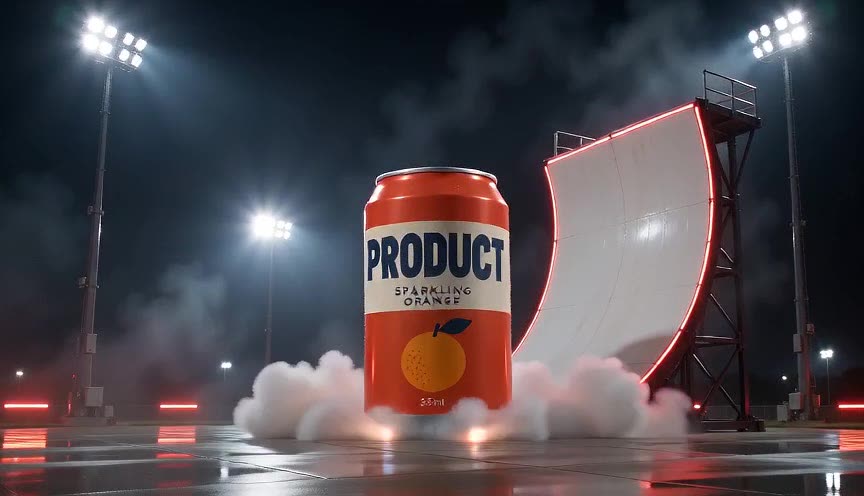
Your product appears at a giant scale, about four metres tall, in a dark test venue with floodlights and red edge lights. It climbs a curved half-pipe wall, goes fully upside down, drops off the lip while rotating back upright on thin jets of gas and touches down in a cloud of white vapor.
For the last two seconds the smoke clears and the camera pushes in to a packshot: the product stands still in the centre with its front label facing the camera. The MP4 comes with rushing air, thruster hiss and touchdown sound effects.
Why the photo is the only input
The car version follows a reference clip of a real car. For products that does not work well: the model tends to redraw the car. So the product template uses your photo plus a written stunt only, and the photo decides the shape, colours, materials, label and logo.
Make it in four steps
- Open the template. Pick Flying Product Ad on the generator page, or go to the flying product AI page.
- Upload one product photo. The whole product, upright, label facing the camera, on a plain background.
- Choose the frame. 9:16 for TikTok, Reels and Shorts, 1:1 for feeds and product pages, 16:9 for YouTube and websites.
- Create. Every video is 720p HD and uses 2 credits. Each render is a new take, so you can try more than one photo.
Photo tips that keep the label readable
- Label facing the camera. The packshot copies your photo, so whatever faces the lens is what people see at the end.
- One product, not cropped. Leave other items, hands and props out of the frame.
- Plain, light background. A white sweep or a simple wall keeps the model focused on the product.
- Even light, few reflections. Glossy cans and glass bottles look best in soft daylight.
- Simple, solid shapes work best. Very thin parts, transparent packaging and tiny print are the hardest to keep exact.
Where to use it
Post it as a short ad on TikTok, Reels or Shorts, put it at the top of a product page, or use it to announce a launch or a new flavour. Florists, drink brands, sneaker resellers and gadget shops are natural fits.
Every render is a new AI video, so small print can blur or change. Check the label before using a clip in paid ads, and only use products and brands you own or have the rights to.
Not official
This is an independent tool, inspired by the flying car trend. It is not affiliated with Tesla or any car brand.
FAQ
What products can fly?
Anything you can photograph as one object: drinks, cosmetics, sneakers, gadgets, toys, flowers and food packaging.
Will my logo stay exactly the same?
It follows your photo closely, but AI can soften small text. A sharp photo with the label facing the camera gives the most faithful packshot.
How is it different from the flying car template?
The car template follows a reference clip of a real car. The product template uses only your photo, adds a closer camera and ends on a packshot.
Does it have sound?
Yes: rushing air, thruster hiss and the touchdown. Add music in TikTok, Reels or CapCut if you like.