
How to Make a Gangnam Style AI Dance Video From One Photo (2026)
 Try this trend
Quick answer: Open the Gangnam Style template, upload one front-facing photo (full body is best), pick a frame and create. You get a 10-second MP4 of that person doing the horse-riding dance with an instrumental beat — no prompt and no reference video needed.
Gangnam Style is the horse-riding dance almost everyone recognises. AI dance videos put anyone into those moves: yourself, a friend, a parent or the coworker who would never do it in real life.
This guide covers what photo to use, how the video is built and how to get the most out of a 10-second clip.
What the video looks like
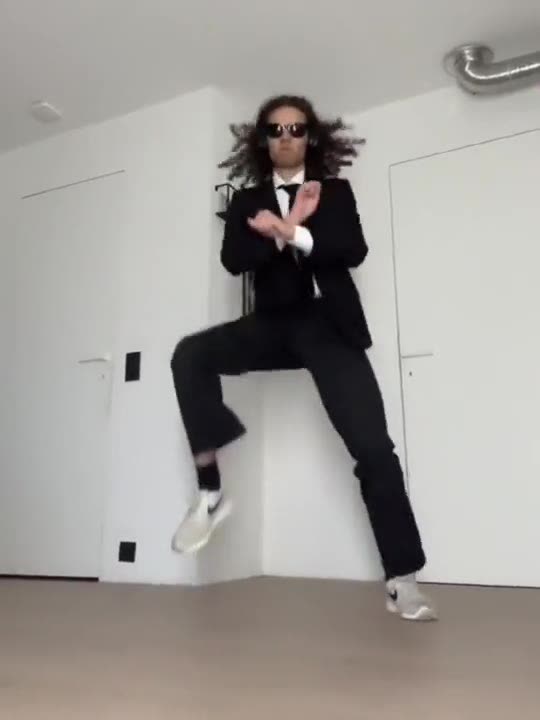
The dancer does crossed-wrist horse-riding steps, side-to-side bounces and the overhead lasso. A short dance reference guides the choreography and camera; your photo supplies the dancer.
About the music
The video does not use the original song. It comes with an upbeat instrumental beat, with no vocals, generated along with the video. Post it as is, or add any sound you like in TikTok, Reels or CapCut.
Steps
- Pick the Gangnam Style template. On the generator page, or from the Gangnam Style AI page.
- Upload one photo. One person, front-facing. A full-body photo shows the footwork best.
- Choose the frame. 9:16 for TikTok, Reels and Shorts, 1:1 for the feed, 16:9 for YouTube.
- Create. Every video is 720p HD and uses 2 credits. The 10-second video lands in My videos.
Getting a clean result
- Full body if you can: head-to-toe photos show the bouncing footwork.
- One person only. Keep other people out of the photo.
- Face the camera so the likeness holds through the bounce.
- Simple background. Busy scenes distract from the dancer.
Casting ideas
The less likely the dancer, the better it lands: a parent in office clothes, a friend in a suit, a team photo turned into individual clips for a group chat. Ask before you use someone’s photo and label the video as AI.
Which frame to pick
Choose the frame for where the clip will live: 9:16 fills a phone screen on TikTok, Reels and Shorts, 1:1 sits neatly in a feed, and 16:9 suits YouTube or a TV in the living room at a family party.
Every video is 720p HD and uses 2 credits. Every render is a new AI video, so when a photo works, a second take gives you a slightly different dance from the same picture.
Not official
This is an independent tool, not affiliated with PSY, his label or TikTok.
FAQ
What app makes a person in a picture dance to Gangnam Style?
A template tool like this one, where the dance is already set up. General image-to-video apps need a prompt or a reference video.
Does it use the original song?
No. It comes with an instrumental beat; add any sound you like in TikTok, Reels or CapCut.
Is it free?
Watching examples is free; each video uses credits (2 per 720p HD video).