
How to Make the Hotel Lobby AI Rap Video With Two Photos (2026)
 Try this trend
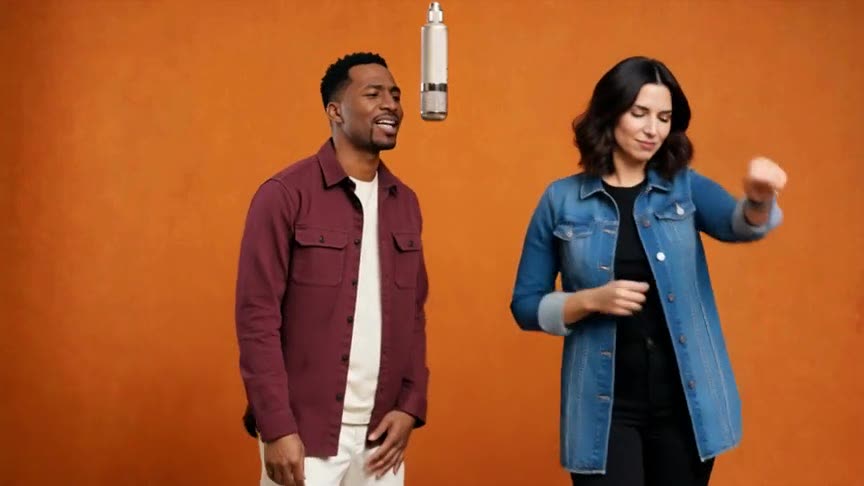
Quick answer: Open the AI Rap Duo template, upload one photo of each person (left rapper first), pick 9:16 for TikTok or Reels and create. In a few minutes you get a 15-second MP4 of both of you rapping in the orange room under the hanging mic, with the original sound. No prompt, no app, no editing.
The AI rap video is the clip where two people rap side by side in an orange studio, with a microphone hanging between them. One reaches across, one checks a watch, both spin. People call it the AI rap duo, the orange-room rap or the Hotel Lobby AI video, and they post it with best friends, couples, coworkers and even pets.
This guide walks through making your own version: what photos work, how the generator uses them and how to get a result worth posting.
What you need
- Two photos, one person in each. The first photo becomes the rapper on the left, the second the rapper on the right.
- Clear, front-facing faces. Sunglasses and side profiles make the likeness drift.
- Upper-body shots if you have them, so the outfits carry over. A selfie also works.
Step by step
- Open the generator. Go to the AI Rap Duo template on the generator page or the AI rap video page. Both run the same studio.
- Add the left rapper. Upload the photo for the person on the left. Crop group photos so only one face is visible.
- Add the right rapper. Upload the second photo. Use two separate images even if you have a photo of both people together.
- Pick the frame. 9:16 suits TikTok, Reels and Shorts, 1:1 the feed and 16:9 YouTube. Every video is 720p HD and uses 2 credits.
- Create and download. The video renders in a few minutes and appears in My videos as an MP4 with the original performance sound.
Why the result has the original sound
The reference performance guides the choreography, camera and timing; your photos guide who is rapping. After the video is generated, the original 15-second performance sound is added back, so the file is ready to post without editing.
Pairings that get replays
The joke is the contrast. A few combinations that work well:
- You and your boss, or two coworkers who never smile in meetings.
- A couple, with the quieter partner on the side that reaches across.
- Grandparents, siblings or a parent and grown-up child.
- A person and their pet — results vary more with animals, so use a sharp, front-facing photo.
If a face does not look right
Each result is a new AI video, so likeness, details and motion can change from one render to the next. Swapping in a sharper, better-lit photo usually helps more than anything else. If a generation fails, its credits are returned automatically.
Only use photos of people who agreed to appear, and label AI-generated clips when you share them.
FAQ
Is there a free tool for the AI rap video?
Not a fully free one here: watching examples is free, and each video uses credits (2 per 720p HD video). Credits come back automatically if a generation fails.
What app makes the hotel lobby rap trend?
A web tool with the trend built in, like the AI Rap Duo template. It runs in your phone browser, so there is nothing to install.
Can I do it with just my own photo?
The template needs two photos. To rap with yourself, upload two different photos of you.
Does it use the original song?
Yes. The original 15-second performance sound is added to the finished video.